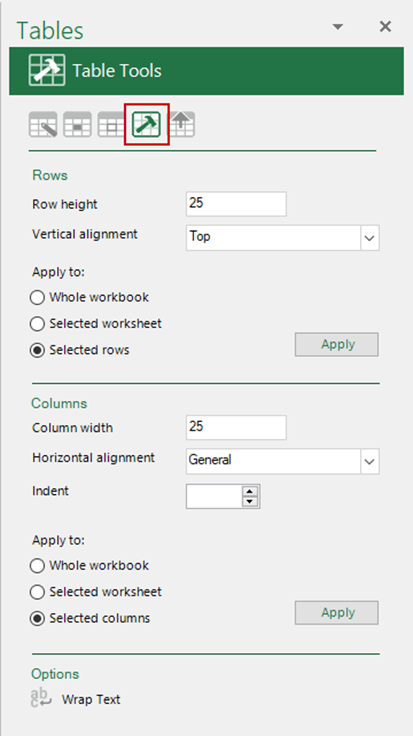
There are tools to apply a row height or column width to a selection, a worksheet or a whole workbook.
To apply a specific row height and vertical alignment
- Enter the row height (measured in points and there are 72 points to an inch).
- Enter the required alignment (leave/select blank to leave the vertical alignment as is).
- Select where you would like the changes to be applied
- the whole workbook
- the current worksheet
- the rows currently selected
To apply a specific column width, a horizontal alignment and/or an indent
- Enter the row height (measured in characters).
- Enter the required alignment (leave/select blank to leave the horizontal alignment as is).
- Enter the required indent.
- Select where you would like the changes to be applied
- the whole workbook
- the current worksheet
- the columns currently selected
- Wrap Text wraps text in a cell or a selection of cells. This function is also on the Create ribbon.
Was this article helpful?
That’s Great!
Thank you for your feedback
Sorry! We couldn't be helpful
Thank you for your feedback
Feedback sent
We appreciate your effort and will try to fix the article