If pressing the buttons in Create is not applying your company's brand formatting as expected, then the document that you are working on may not be saved in the correct format.
Examples of issues you might see in this case are:
- Bullet symbols incorrect or not applied
- Table formats do not adapt when you add and remove rows
- Table format rows too widely spaced
To work with Create correctly, documents must be saved in Word Document (*.docx) or Word Macro-Enabled Document (*.docm) format.
Create will not work as expected with documents saved in other formats, for example: Word 97-2003 Document (*.doc), OpenDocument Text (*.odt), HTML, XML or Rich Text Format.
How to ensure my documents are saved in true Word format
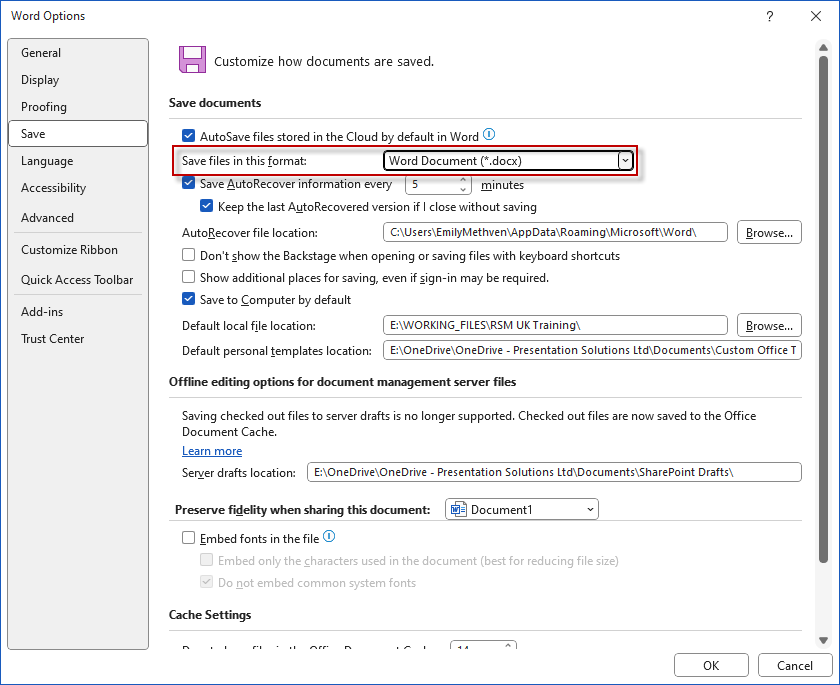
- Go to File > Options and in the Word Options dialog choose the Save category.
- Ensure that the Save files in this format drop-down list is set to Word Document (*docx). This will ensure that Word defaults to this option when you save a document. Do not select another format in the Save As pane/dialog.
Was this article helpful?
That’s Great!
Thank you for your feedback
Sorry! We couldn't be helpful
Thank you for your feedback
Feedback sent
We appreciate your effort and will try to fix the article