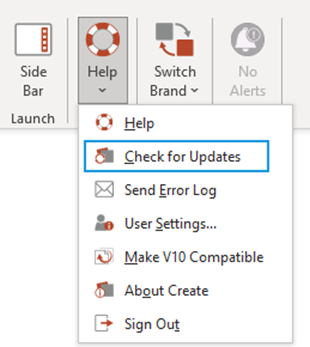
This option allows the user to download any recent updates to the Create software including updates to client customisations, licensing, product features, enhancements and fixes and the Help user guide.
To check for updates:
- From the Create tab select Help.
- From the dropdown menu select Check for Updates
- This will prompt the software to download any available updates to the Create software and client customisation.
- Wait a few moments for the changes to sync and the New Alerts button to show.
- Close all Office Applications, and reopen.
Was this article helpful?
That’s Great!
Thank you for your feedback
Sorry! We couldn't be helpful
Thank you for your feedback
Feedback sent
We appreciate your effort and will try to fix the article