If an additional file opens when starting PowerPoint, instead of just your Create default template you will need to reset your PowerPoint Default Theme to the Office Theme.
- From the Themes group on the Design tab, open up the available themes.

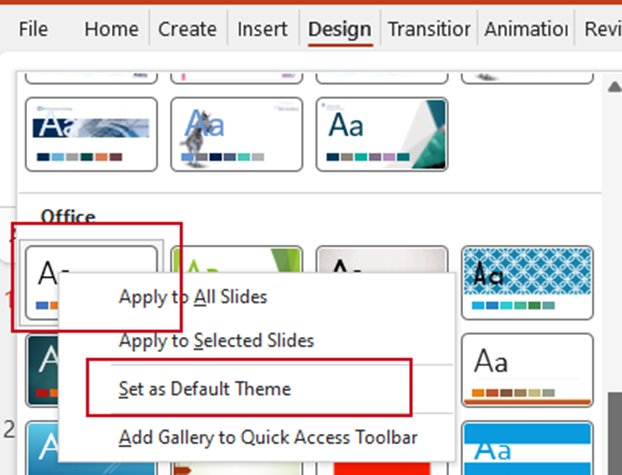
- Scroll down to the set of themes under Office and right-click on the first theme. Select Set as Default Theme.
- Close PowerPoint and make sure there are no background processes of PowerPoint still open.
- Right-click on the taskbar at the bottom of the screen and open Task Manager.
- Click on any instances of Microsoft PowerPoint and choose End Task.
- Reopen PowerPoint.
The only template that should open is the one you have selected in your User Settings in Create.
Was this article helpful?
That’s Great!
Thank you for your feedback
Sorry! We couldn't be helpful
Thank you for your feedback
Feedback sent
We appreciate your effort and will try to fix the article