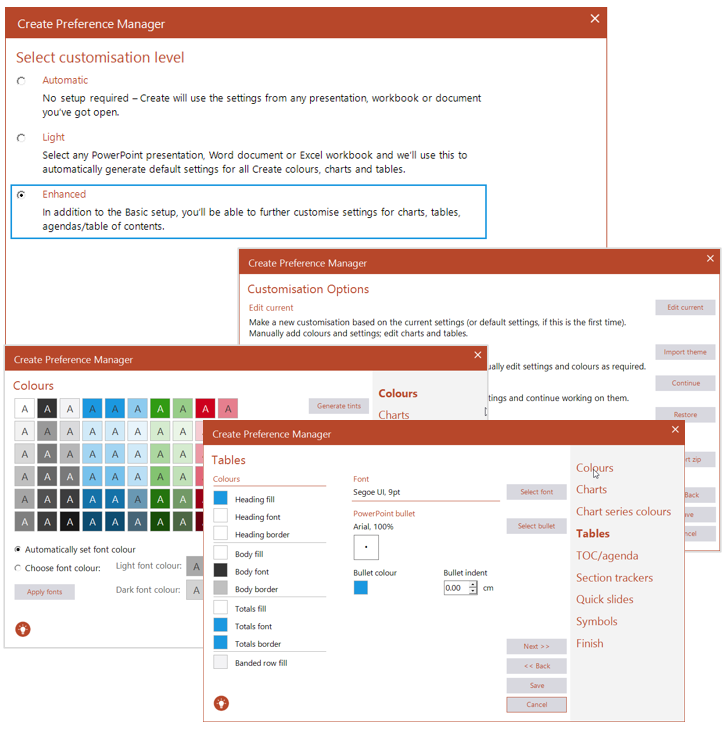
The Enhanced customization level will launch a wizard to walk you through a more detailed customization of the Create toolbar settings.
Customizations can be edited, imported from an existing theme or zip files or continued from a previously saved setting. Previously saved settings can also be restored to a document.
The customization wizard allows you to perform the following:
- Modify the Create colour palette
- Fine-tune chart settings and colour themes
- Choose table settings including font, size, bullet, shading and total formats
- Customize the TOC/Agenda settings
- Format the Section Tracker bar
- Select quick slide layouts
- Import symbols that can be quickly accessed from the Create toolbar
Enhanced customization settings can be incorporated in your toolbar immediately or exported to a zip to share with other Create users.
Was this article helpful?
That’s Great!
Thank you for your feedback
Sorry! We couldn't be helpful
Thank you for your feedback
Feedback sent
We appreciate your effort and will try to fix the article