The Insert group contains a number of preformatted objects or different page setups that you can choose to insert into your document.
______
The standard page orientation for most Word documents is portrait. However, if certain information would be better displayed in landscape format, a preformatted landscape page can be inserted within the document.
Place your cursor where you wish the new landscape page to appear.
With your cursor on a blank paragraph marker, select Landscape on the Create ribbon.
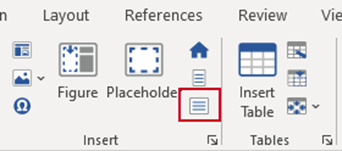
A section break will be inserted, followed by the landscape page, followed by another section break. All the text or graphics for the landscape page should be inserted between the two section breaks.
Deleting a Landscape Page
To delete a landscape page (that has been inserted via the Landscape function), select from the beginning of the first section break, up to and including the section break at the end of the landscape page and delete.
Was this article helpful?
That’s Great!
Thank you for your feedback
Sorry! We couldn't be helpful
Thank you for your feedback
Feedback sent
We appreciate your effort and will try to fix the article