We would normally recommend that you set your regional settings to match the language you are working in, however if you do not wish to change your Windows Region settings but you need to use a different language in a document that you are working on there are some options that you can set in Excel.
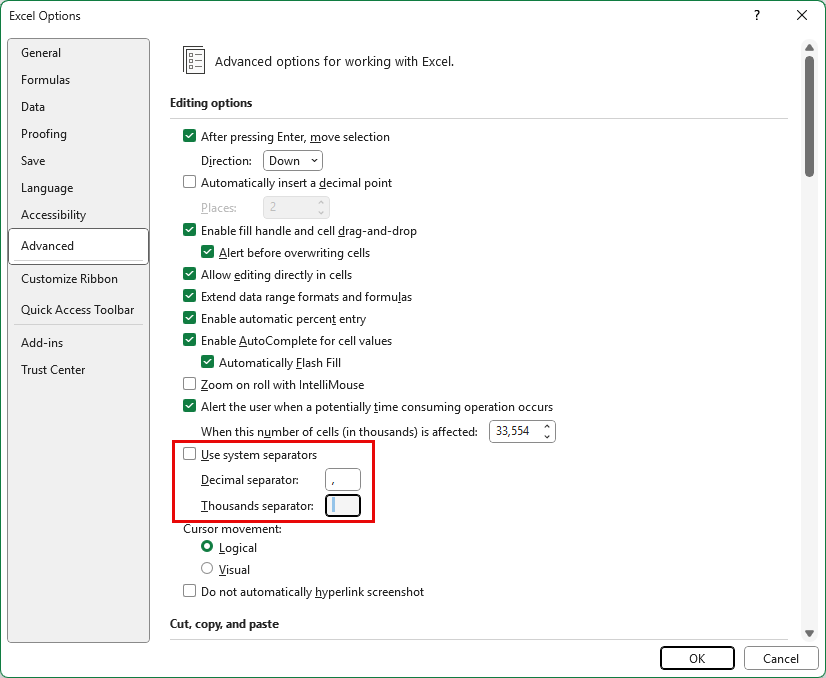
Decimal and thousands separators
You can use the following option in Excel to override the separators used in number formats on your PC.
Date formats
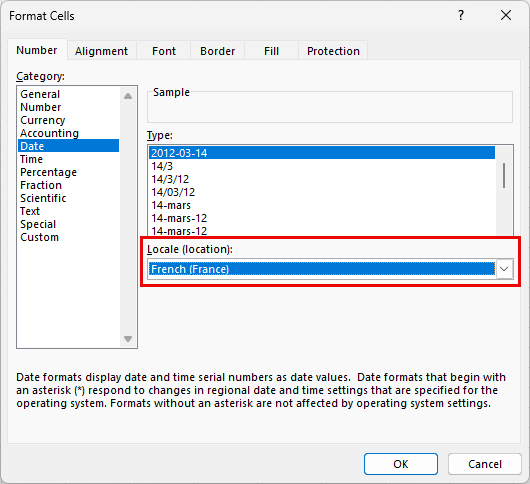
When you format dates in your worksheet, apply the correct Locale and then the format should override the Windows Region date setting. If you share this workbook with another user the date format will also override the regional settings on their PC.
If PowerPoint or Word still reverts the Excel settings once you have sent the object from Excel then you should use the Table As Picture and Chart As Picture options to retain the Excel formatting.
Was this article helpful?
That’s Great!
Thank you for your feedback
Sorry! We couldn't be helpful
Thank you for your feedback
Feedback sent
We appreciate your effort and will try to fix the article