The Shape Tools and Shape Settings panels allow you to arrange, format and position shapes on individual slides or multiple slides easily.
______
The Shape Tools panel includes functions to distribute a selection of shapes evenly or at a fixed equal gap and copy attributes from one shape to another either on the current slides or other slides. There are also some text tools for text in shapes and placeholders.
Select Tools on the ribbon OR open the Shapes & Images task pane from the side bar.
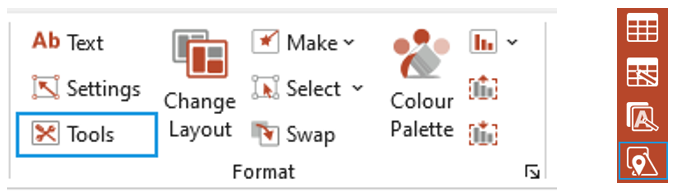
Open the Shape Tools panel (if you opened the pane from the side bar).
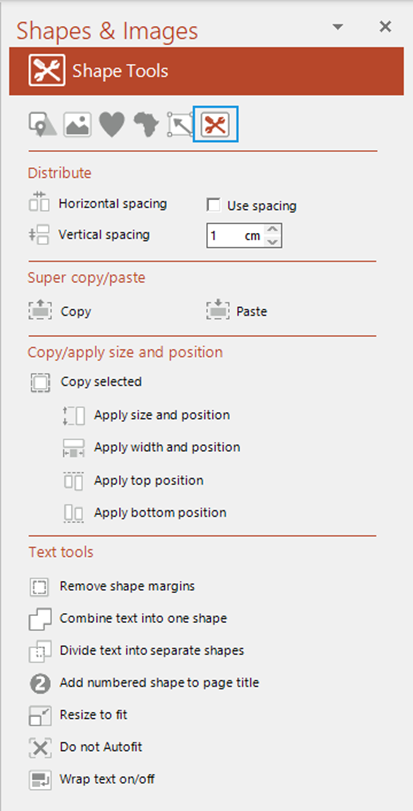
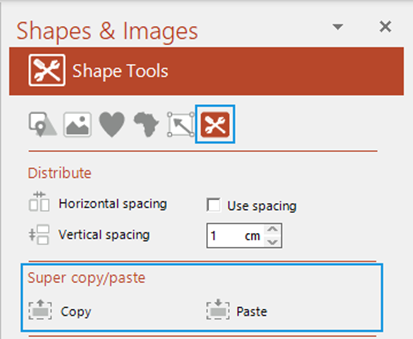
Super Copy/Paste
This function allows a user to copy the properties, such as size, position and formatting including margins and text formatting, of a shape to another shape on another or on the same slide.
- Select the shape whose properties you wish to copy.
- Select Copy.
- Select the shape whose properties you wish to make the same.
- Select Paste.
The second shape will take on all the properties of the first.
Was this article helpful?
That’s Great!
Thank you for your feedback
Sorry! We couldn't be helpful
Thank you for your feedback
Feedback sent
We appreciate your effort and will try to fix the article