The Agenda/Table of Contents (TOC) slide lists the main topics in the presentation. It usually appears after the cover slide and can display either the titles on the section and appendix divider slides and/or the slide titles. Subsection titles are optional and can be added to the section and appendix divider slides and included in the Agenda/TOC. Hyperlinks can be included to help navigate through the presentation.
Update the agenda by selecting Update, Agenda/TOC in the Linking group on the Create ribbon.
_______
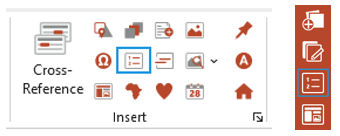
To insert an Agenda/TOC, select TOC/Agenda in the ribbon or side bar.
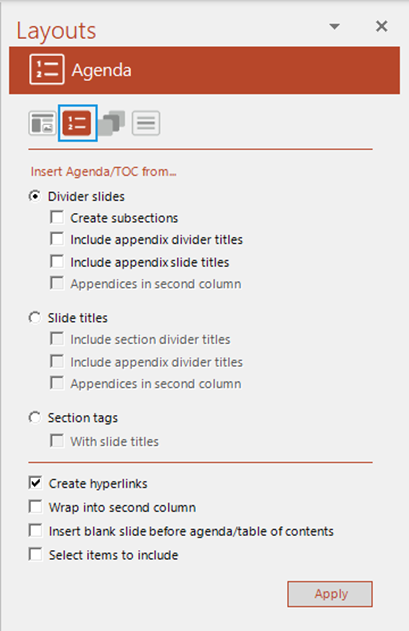
The Layouts task pane opens at the Agenda panel.
Check Divider slides to include section divider titles and then select from the following
- Check Create subsections to include subsections.
- Check Include appendices divider titles to include appendices.
- Check Include appendix slide titles to include the titles of slides that appear after a single appendix divider (i.e. single page appendices).
- Check Appendices in second column to list the appendices next to the sections rather than beneath.
- Check Slide titles to only list the slide titles in your presentation (if there are no section/appendix dividers).
To include slide titles and section and appendix divider titles, check the options below Slide titles.
- Section tags check this to pick up native PowerPoint section titles.
- With slide titles will pick up any slide titles that are part of native PowerPoint sections.
- Check Create hyperlinks to include hyperlinks.
- Check Wrap into second column if you would like to keep the agenda on one slide, if possible. This will usually apply a smaller font size to the agenda to allow it to fit on to one page. If this is left unchecked the agenda will wrap on to two slides if necessary.
- Check the Insert blank slide before agenda/table of contents box if you are printing double-sided and want a blank slide before the Agenda/TOC slide.
- Check Select items to include to select only certain items in the Agenda.
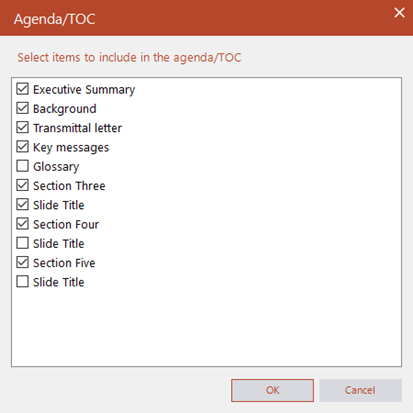
This will open a dialog which will list all the items based on your selection in the Agenda panel.
- Select those items you wish to include in the Agenda.
- Click OK.
If you need to edit any details on the agenda/TOC, make the changes on the divider slides and then select Update, Agenda/TOC in the Linking group on the Create ribbon.
Was this article helpful?
That’s Great!
Thank you for your feedback
Sorry! We couldn't be helpful
Thank you for your feedback
Feedback sent
We appreciate your effort and will try to fix the article