Error message:
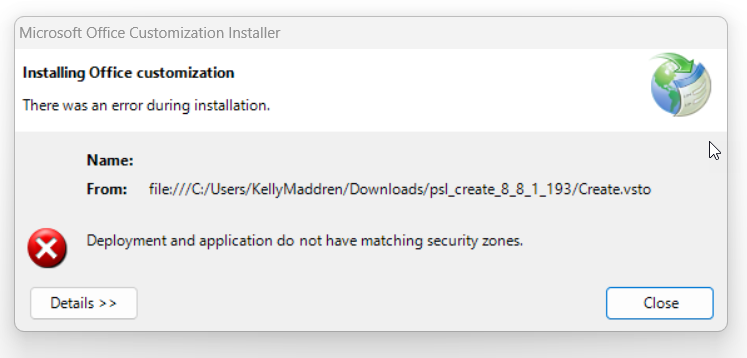
There are a few reasons this can occur:
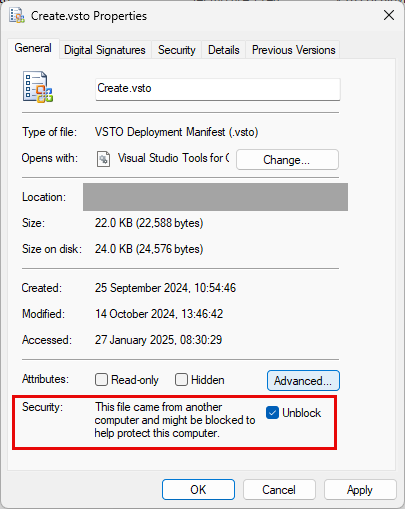
- The most common reason is when the setup.exe is downloaded onto the user’s machine sometimes Windows adds a zone identifier flag to the file to show it was downloaded from the internet. This can also occur with the Create.vsto file used by local deployment. To resolve this issue, right-click on the setup.exe or Create.vsto file and select Properties. In the Properties dialogue, tick the Unblock checkbox in the security section and try again to run the file. As shown in the screenshot below.
- The users machine has security permissions and settings, which are preventing the installer from running. Compare the settings on the machine to other users who have installed the software successfully.
- The device the software is being installed on does not have the root certificate present in the certificate store necessary to install the software. Normally these are present after updates to Windows, however if the updates are controlled or managed sometimes such updates are not permitted/applied.
- The software has been supplied as a zip of Local Deployment files and the Create.vsto is being run whilst it is still contained within the zip.
Was this article helpful?
That’s Great!
Thank you for your feedback
Sorry! We couldn't be helpful
Thank you for your feedback
Feedback sent
We appreciate your effort and will try to fix the article