An online help is available in each programme in Create (i.e. Word, PowerPoint and Excel).
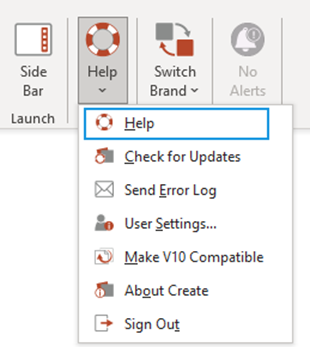
To access the help menu
On the Create ribbon select Help.
From the dropdown menu select Help
On the contents pane, main topic headings are listed on the left of the window. A tick next to a topic indicates that further subtopics are available under the selected topic. A plus sign indicates that selecting the topic will display the topic text and no further subtopics.
Under “related topics”, blue text indicates that the topic has not been accessed previously; purple indicates that it has been accessed.
Was this article helpful?
That’s Great!
Thank you for your feedback
Sorry! We couldn't be helpful
Thank you for your feedback
Feedback sent
We appreciate your effort and will try to fix the article