
- Compare Report – button will launch the task pane to create a Detailed Compare, Summary Redline Report or Merge
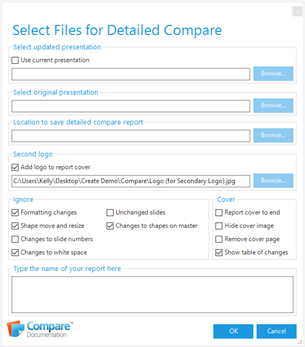
- Ignore – options that you can choose to exclude from your Detailed Compare Report
- Options – you can choose to put the report cover at the end and/or to hide the cover image which is included within the report and show a table of changes
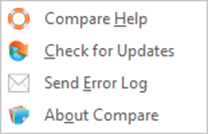
- Help
- Compare Help An online help is available in each programme in Compare (you do not need the internet to view the Help)
- Check for Updates Download updates to Compare Documentation
- Send Error Log Sending us the Compare Documentation error log if you have experienced problems using Compare Documentation will allow us to investigate the issue.
- About Compare Tells you which version of the software is installed
- Register… Prompt to register your version of Compare (only visible if you haven’t yet registered your version of Compare Documentation
- Compare Help An online help is available in each programme in Compare (you do not need the internet to view the Help)
Detailed Compare Report dialog
Help dropdown
Was this article helpful?
That’s Great!
Thank you for your feedback
Sorry! We couldn't be helpful
Thank you for your feedback
Feedback sent
We appreciate your effort and will try to fix the article