In all versions of Create we employ native menu keyboard shortcuts.
When you select ALT on your keyboard, letters in the ribbon names indicate the keyboard access to that ribbon’s functions. For example, ALT+C opens the Create ribbon.
The keyboard shortcuts for each command are then displayed. To access a feature in the Create ribbon, press ALT-C and then the letters shown (for example to insert a table you would select ALT+CTI).

Shortcut Keys for Main Functions
| ALT C + | PN | New | ALT C + | TI | Table |
|---|---|---|---|---|---|
| PD | Document Setup | TF | Format Table | ||
| PS | Slide No's | TP | Paste Subset | ||
| D | Draft | TS | Sort | ||
| PG | Guides | TT | Table Borders | ||
| PO | Options | FX | Text Formats | ||
| IR | Cross-Reference | FG | Shape Settings | ||
| IS | Shapes | FO | Shape Tools | ||
| IY | Symbols | FL | Change Layout | ||
| IL | Slide Layout | FM | Make | ||
| IV | Dividers | FE | Select | ||
| IA | TOC/Agenda | FS | Swap | ||
| IM | Maps | FC | Colour Palette | ||
| IX | Text Library | FH | Chart | ||
| IT | AutoText | FP | Copy Size | ||
| II | Icon | FY | Apply Size | ||
| IG | Image | FT | Show Text Formats | ||
| IP | Picture | LL | View Links | ||
| IC | Calendar | LP | Package | ||
| IK | Insert Map Point | LU | Update | ||
| IE | Select Map Point | LV | View Selected | ||
| IH | Insert Home Link | LS | Update Selected | ||
| IZ | Show Symbols | 1 | 1 Up Layout | ||
| 2 | 2 Up Layout | ||||
| 4 | 4 Up Layout | ||||
| SB | Side Bar | ||||
| EH | Help | ||||
| BS | Switch Brand |
Shortcut Keys for Dropdown Functions
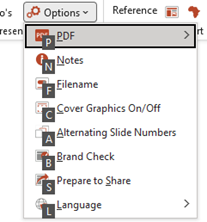
| ALT C + | PO | Options | |
|---|---|---|---|
| P | |||
| N | Notes | ||
| F | Filename | ||
| C | Cover Graphics On/Off | ||
| A | Alternating Slide Numbers | ||
| B | Brand Check | ||
| S | Prepare to Share | ||
| L | Language |
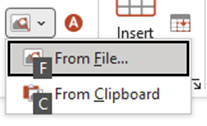
| ALT C + | IP | Picture | |
|---|---|---|---|
| F | From File | ||
| C | From Clipboard |
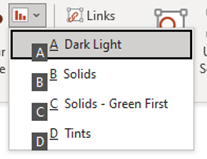
| ALT C + | FH | Chart | |
|---|---|---|---|
| A | Theme A | ||
| B | Theme B | ||
| C | Theme C | ||
| D | Theme D |
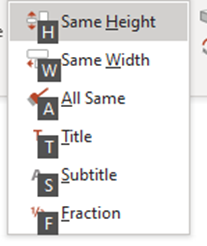
| ALT C + | FM | Make | |
|---|---|---|---|
| H | Same Height | ||
| W | Same Width | ||
| A | All Same | ||
| T | Title | ||
| S | Subtitle | ||
| F | Fraction |
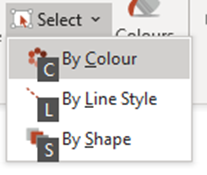
| ALT C + | FE | Select | |
|---|---|---|---|
| C | By Colour | ||
| L | By Line Style | ||
| S | By Shape |
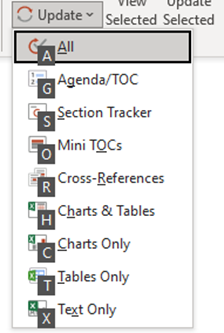
| ALT C + | LU | Update | |
|---|---|---|---|
| A | All | ||
| G | Agenda/TOC | ||
| S | Section Tracker | ||
| O | Mini TOCs | ||
| R | Cross-References | ||
| H | Charts & Tables | ||
| C | Charts Only | ||
| T | Tables Only | ||
| X | Text Only |
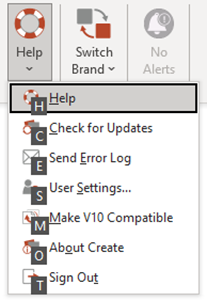
| ALT C + | EH | Help | |
|---|---|---|---|
| H | Help | ||
| C | Check for Updates | ||
| E | Send Error Log | ||
| S | User Settings | ||
| M | Make V10 Compatible | ||
| O | About Create | ||
| T | Sign Out |
Was this article helpful?
That’s Great!
Thank you for your feedback
Sorry! We couldn't be helpful
Thank you for your feedback
Feedback sent
We appreciate your effort and will try to fix the article