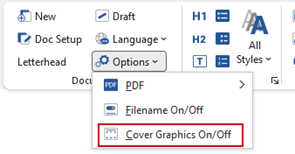
This function displays or hides cover graphics on the cover page of your document (the availability of this function depends on your customisation and may not be applicable to all templates) – useful if you are planning to print on to pre-printed covers.
Select Options, Cover Graphics On/Off on the Create ribbon.
Was this article helpful?
That’s Great!
Thank you for your feedback
Sorry! We couldn't be helpful
Thank you for your feedback
Feedback sent
We appreciate your effort and will try to fix the article