The Insert group contains a number of preformatted objects or different page setups that you can choose to insert into your document.
______
The Library contains frequently used text, graphics or other content such as section and appendix dividers. These may be categorised by template name or type of content. If your customisation does not contain any library content, the option will not be displayed on the Create tab.
To insert content from the Library, go to the location where you want to insert the content. Insert a blank paragraph marker and apply the style Body Text. If you are inserting a new section, there is no need to insert section breaks as these are included as part of the library content.
Select Library on the ribbon or side bar.
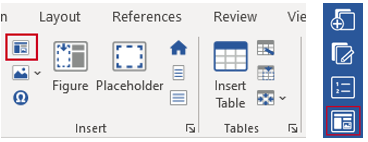
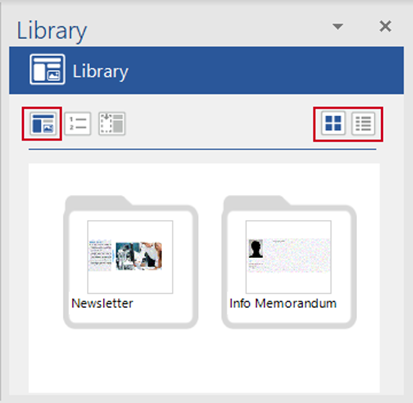
The Library task pane will open. If there is different library content for different templates within your customisation, they will be in folders, usually named the same as the templates.
You can change views by clicking the list or thumbnail icons on the top right of the task pane.
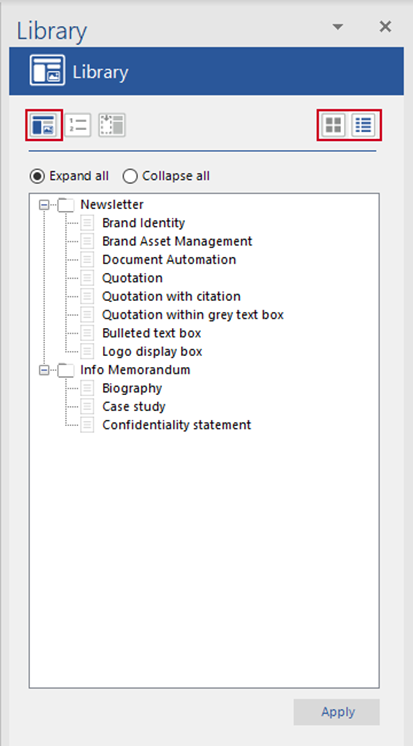
In list view, select Expand all, to see all templates, or click the + to expand a single category.
Select the required library content and click Apply.
The selected library content will be inserted into your document.
Was this article helpful?
That’s Great!
Thank you for your feedback
Sorry! We couldn't be helpful
Thank you for your feedback
Feedback sent
We appreciate your effort and will try to fix the article