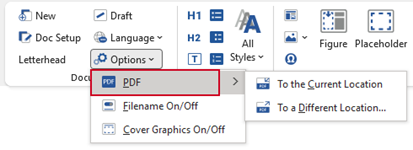
Saves your current document as a PDF either to the current file location or to a new location with a different name. Both options will prompt you to save the Word file, and then create a PDF with non-printing information and properties removed.
Select Options, PDF on the Create ribbon.
Was this article helpful?
That’s Great!
Thank you for your feedback
Sorry! We couldn't be helpful
Thank you for your feedback
Feedback sent
We appreciate your effort and will try to fix the article