This function will generate a copy of your PowerPoint file as a PDF or a PowerPoint file (.pptx), which can be shared for reviewing, whether internally or externally. When using this function, users will be presented with a series of actions that can be performed before the file is saved.
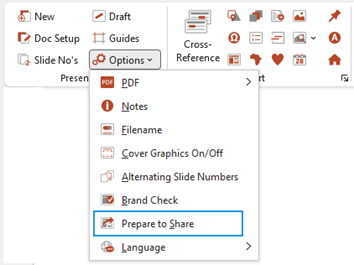
Select Prepare to Share from the Options dropdown on the Create ribbon.
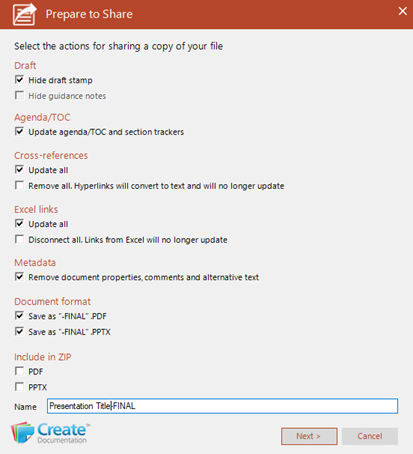
The Prepare to Share dialog opens.
Select Next, to produce a copy of the file based on the default selections (these selections will be stored for the next time you select this function) or select new actions that will be performed before the file is saved.
Draft
- Hide draft stamp check this to hide the draft stamp that has been inserted via Create.
- Hide guidance notes check this to hide any guidance/instructions notes that you have added (i.e. any shapes named Instructions).
Agenda/TOC
- Update agenda/TOC and section trackers will update the Agenda/TOC and any section trackers (if your presentation contains these) before saving the file.
Cross-references
- Update all: check this to update all the cross-references.
- Disconnect all: check this to disconnect all the linked objects from Excel.
Metadata
- Remove document properties, comments and alternative text: check this to remove any of these from the PowerPoint file before it’s saved.
Document format
- The copy of the file can be saved as a PowerPoint file (.pptx) or a PDF, or both. Check your preferred option.
Include in ZIP
- To create a .ZIP file containing either the .pptx file or the PDF file, check one or both of these options.
Was this article helpful?
That’s Great!
Thank you for your feedback
Sorry! We couldn't be helpful
Thank you for your feedback
Feedback sent
We appreciate your effort and will try to fix the article