This option displays or hides a home link icon on every page in the document. This home link icon contains a hyperlink to the Table of Contents. When your document is saved as a PDF, you will be able to click on the icon and you will be taken to the Table of Contents page (the availability of this function depends on the template and your customisation).
Select Home Link on the Create ribbon.
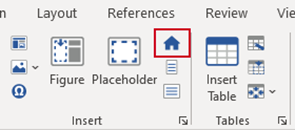
A home link icon will be inserted, usually in the header, on every page in the presentation after the Table of Contents page.
To hide the home link icon select Home Link again.
This function will only work when the document is saved as a PDF.
Was this article helpful?
That’s Great!
Thank you for your feedback
Sorry! We couldn't be helpful
Thank you for your feedback
Feedback sent
We appreciate your effort and will try to fix the article