Use the Create table tools to insert and format tables in your organisation’s branding, rather than native Word to ensure you are using the correct formatting.
Compressing Columns
This reduces the column width of the whole table or selected columns, when space is needed to accommodate more data, or your table no longer fits the available area.
If the table still does not fit the area, then consider reducing the font size of the whole table.
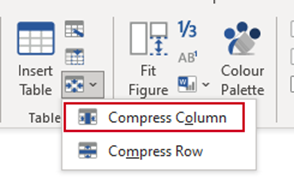
With your cursor in the column/s, select Compress Column from the Compress dropdown.
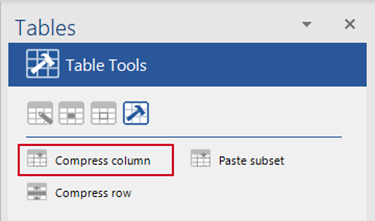
OR, from the Table Tools panel select Compress column.
Compressing Rows
This reduces the cell padding of the selected row/s or the whole table if more space is needed to accommodate more data or your table no longer fits the available area.
If the table still does not fit the area, then consider reducing the font size of the whole table.
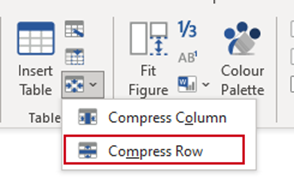
With your cursor in the column/s, select Compress Row from the Compress dropdown.
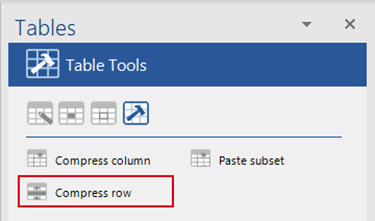
OR, from the Table Tools panel select Compress row.
Was this article helpful?
That’s Great!
Thank you for your feedback
Sorry! We couldn't be helpful
Thank you for your feedback
Feedback sent
We appreciate your effort and will try to fix the article