You can preview charts with formatting or resizing applied before sending them to PowerPoint or Word.
To resize the chart to fit a placeholder in PowerPoint or Word, select the placeholder first.
In Excel, select the chart.
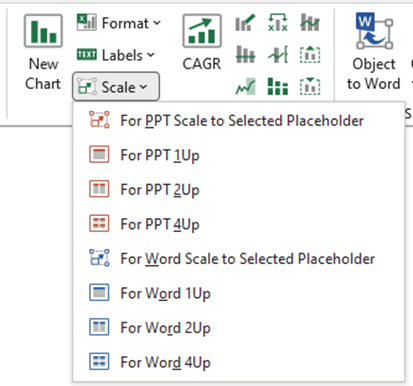
From the Scale dropdown, select one of the following
- For PPT or Word Scale to Selected Placeholder resizes to fit the placeholder only.
- For PPT or Word 1 Up resizes the chart to fit a 1 Up placeholder.
- For PPT or Word 2 Up resizes the chart to fit a 2 Up placeholder.
- For PPT or Word 4 Up resizes the chart to fit a 4 Up placeholder.
Was this article helpful?
That’s Great!
Thank you for your feedback
Sorry! We couldn't be helpful
Thank you for your feedback
Feedback sent
We appreciate your effort and will try to fix the article