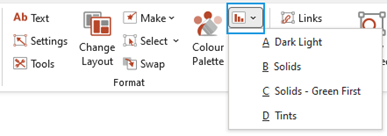
This function formats embedded Microsoft Charts using one of your organisation’s custom themes, directly in PowerPoint.
- Select Chart and select one of the customised chart themes.
| Notes Whilst this will format both PowerPoint charts and charts that were created in Excel, we recommend Excel charts be formatted at source in Excel, as any formatting applied to the chart in PowerPoint will be overwritten when the links are updated. |
Copy and Apply Size
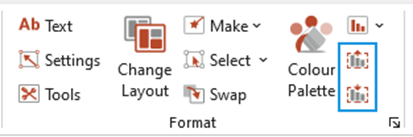
This function copies the size of the chart area, the size of the plot area and the position of the chart so that these attributes can be applied to the plot area of another chart resulting in consistency in the look of charts.
- Select the chart and select Copy Size.
- Select the chart whose dimensions you wish to resize and select Apply Size.
Was this article helpful?
That’s Great!
Thank you for your feedback
Sorry! We couldn't be helpful
Thank you for your feedback
Feedback sent
We appreciate your effort and will try to fix the article