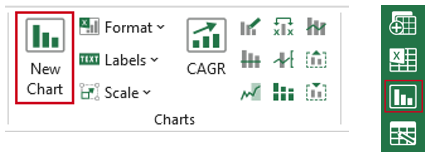
The Charts group contains options to create charts, format existing charts with your organisation’s branding (by applying a “theme”) and send charts to Word or PowerPoint with a link back to the original source data. Other features include adding average lines, forecasts periods, axis splits, secondary axes and labels. There are also tools to help create more complicated charts such as: Bar Gantt; Bridge/Waterfall; Bubble; Column and Line; Marimekko; Price/Volume; Stacked Cluster; Timeline; XY Scatter.
Creating Charts
Use the New Chart function to create a chart as this will apply a customised chart theme at the same time. There are also more chart types available than in native Excel e.g. Waterfall charts and Price Volume.
Select the data for your chart. Select Charts on the ribbon or side bar.
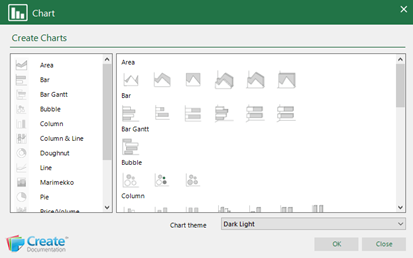
- In the Chart dialog, select the required chart type category on the left and then the required chart type on the right.
- In the Chart theme box, select the required customised theme from the dropdown.
- Click OK.
The chart will be inserted on the worksheet.
Was this article helpful?
That’s Great!
Thank you for your feedback
Sorry! We couldn't be helpful
Thank you for your feedback
Feedback sent
We appreciate your effort and will try to fix the article