When opening the Images and Shapes pane, the error "The task pane cannot be loaded. Input string was not in correct format." can occur if the user's Region settings use a comma or apostrophe for the Decimal symbol rather than a period.
As at January 2024, this issue has been added to our development list for a fix in the next software release of Create.
In the meantime, you can use the following workaround to enable the pane to work.
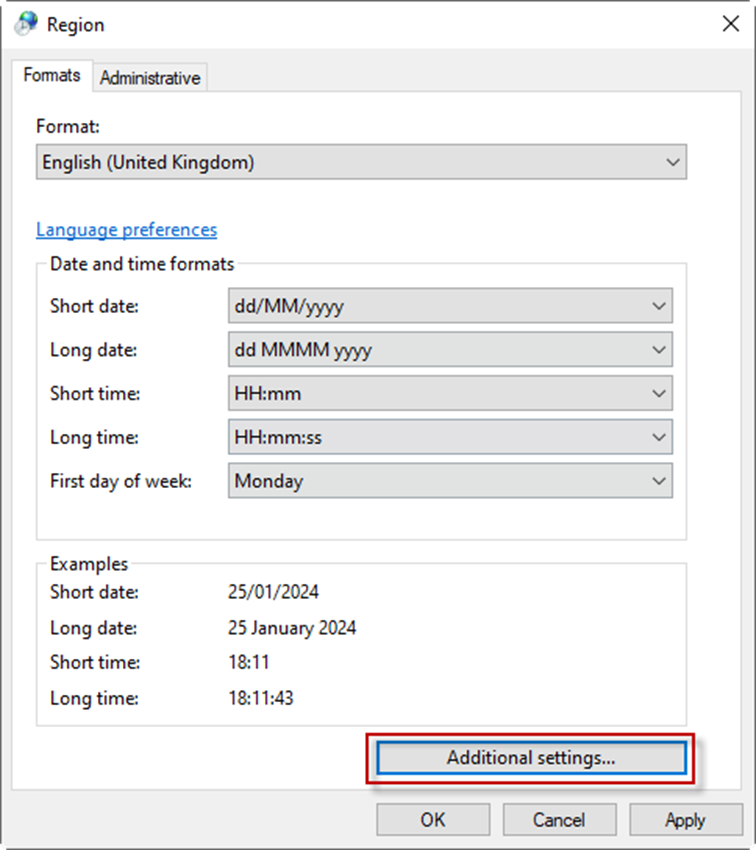
- Go to the Windows Control Panel and select Region
- Change the Format to an English setting, or if that is not possible at a lower level press Additional Settings... as shown in the screenshot below and change the Decimal symbol in the Numbers tab to "."
Was this article helpful?
That’s Great!
Thank you for your feedback
Sorry! We couldn't be helpful
Thank you for your feedback
Feedback sent
We appreciate your effort and will try to fix the article