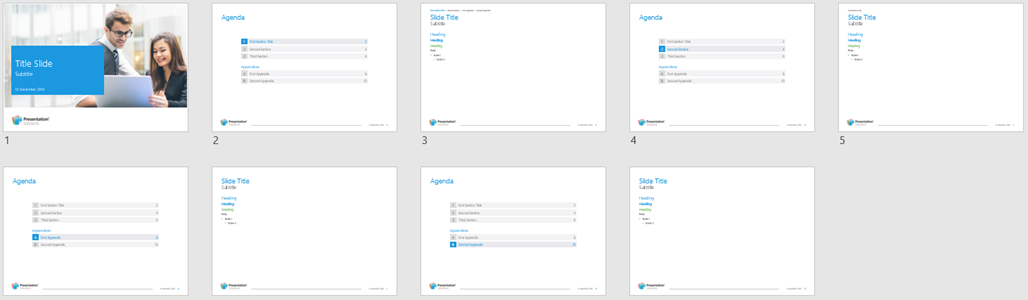
Presentations can be divided into sections and appendices. There are two types of section and appendix divider slides:
A slide displaying the section/appendix name and number (and an agenda/table of contents at the beginning of the presentation).

OR
“Repeated dividers” which list all the sections and appendices in the presentation with the current section/appendix highlighted (therefore no agenda/table of contents at the beginning of the presentation).
Subsection titles are optional and can be added to the section divider slides and included in the agenda/table of contents.
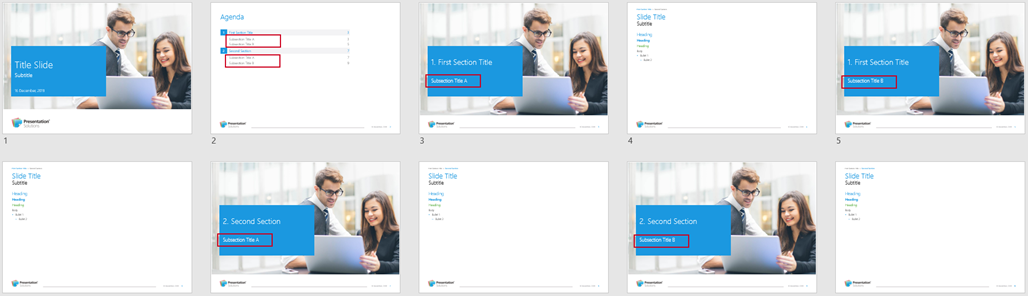
Subsections
If you wish to display subsections in the agenda/table of contents, you need to ensure that the main section title is identical on all subsection divider slides in order that the section title only displays once on the agenda/table of contents.
Retype the section title in subsequent divider slides OR duplicate the first section divider (CTRL+D) of the group, change the subsection title and move to the desired location.

Was this article helpful?
That’s Great!
Thank you for your feedback
Sorry! We couldn't be helpful
Thank you for your feedback
Feedback sent
We appreciate your effort and will try to fix the article