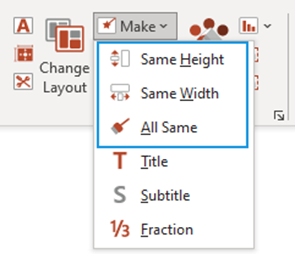
This function contains options for applying selected attributes or effects to a shape or shapes.
- Select the object which is already of the required height, then select the other objects whose attributes you wish to adjust. Or use the Select tool.
- Select Make and from the dropdown select Same Height, Same Width or All Same (which will also apply the same formatting such as border and fill).
Notes All objects must be ungrouped for this function to perform correctly. |
Was this article helpful?
That’s Great!
Thank you for your feedback
Sorry! We couldn't be helpful
Thank you for your feedback
Feedback sent
We appreciate your effort and will try to fix the article