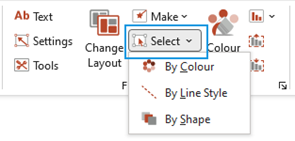
The Select function picks up multiple objects on a slide that have similar attributes. This is handy for simultaneous updating of fill or line colour, shape or other formatting. The Select function can only pick up shapes that are not grouped.
- From the Select dropdown, choose By Colour, By Line Style, or By Shape.
All the objects with the same selected attributes will be selected, ready to recolour, resize, etc.
Was this article helpful?
That’s Great!
Thank you for your feedback
Sorry! We couldn't be helpful
Thank you for your feedback
Feedback sent
We appreciate your effort and will try to fix the article