Inserting the Wrong Chart from Excel in Word/PPT
If you find that there is more than one chart on the same worksheet with the same chart name. Create® will not be able to distinguish between them. Generally when charts are copied and pasted within a worksheet Excel gives each chart a unique name, i.e. if you copy Chart 1 it is pasted as Chart 2. Occasionally, Excel does not rename the new version of the chart correctly.
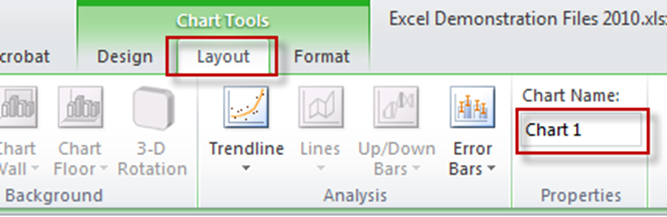
You check and edit chart names by selecting a chart and then selecting the layout tab within the Green Chart Tools tab that appears on the ribbon. The Chart Name is displayed at the far right-hand end of the ribbon. You can edit the chart name by typing in the next box.
You should rename one of the charts so that it has a different name.
Was this article helpful?
That’s Great!
Thank you for your feedback
Sorry! We couldn't be helpful
Thank you for your feedback
Feedback sent
We appreciate your effort and will try to fix the article