Inserting a Table of Appendices
The Table of Appendices (TOA) lists all the Appendix Titles within the document, and further levels of Appendix Headings, if selected. If the document type selected has a TOA, a default version will be included within the new document on creation. However, this is configurable and can be changed at any time to suit your requirements.
Delete any existing Table of Appendices and page heading (the function will insert a new page heading).
Place your cursor where you want the new Table of Appendices to appear.
Select Insert, Insert Table of Appendices on the Create ribbon.
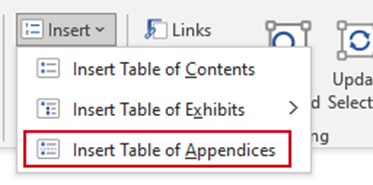
A new TOA will be inserted on the correct page in your document.
Notes |
Editing the TOA
The Table of Appendices can be configured to include various levels of headings. Place your cursor in the TOA you wish to customise.
Select Edit on the Create ribbon.
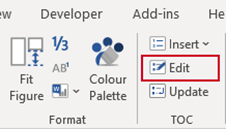
The TOC task pane will open.
- Up to four levels of Appendix heading can be included in the TOC. Each level is based on the Appendix Heading styles 1-4 within the document.
- Check the boxes to the left of the headings you wish to include in the TOA.
- The field codes in the TOC are also displayed in the TOC dialog and can be edited by users if further customisation is required.
- Click Apply.
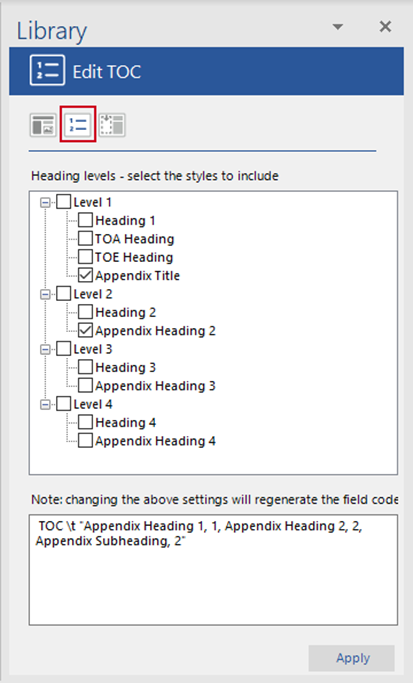
The TOC will be updated with the requested information.
Updating the TOA
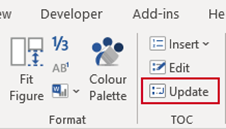
After inserting or deleting sections or appendices or making changes to headings that are included in the TOCs, select TOC, Update.
Was this article helpful?
That’s Great!
Thank you for your feedback
Sorry! We couldn't be helpful
Thank you for your feedback
Feedback sent
We appreciate your effort and will try to fix the article