You can apply one of your organisation’s customised chart themes to any chart on your Excel worksheet, without sending it to, or sizing it for insertion into a placeholder in PowerPoint or Word. You might do this when there is no destination presentation yet in PowerPoint or Word or you wish to view how a chart would look before sending to Word or PowerPoint.
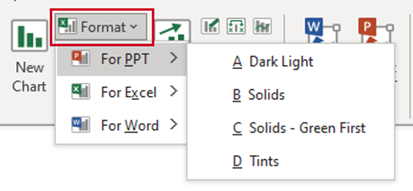
- Select the chart and select Format on the ribbon.
- Select For PPT, For Excel, or For Word and the required theme.
Was this article helpful?
That’s Great!
Thank you for your feedback
Sorry! We couldn't be helpful
Thank you for your feedback
Feedback sent
We appreciate your effort and will try to fix the article