The letterhead appears by default in a letter template only – this might include your organisation’s logo and address. This can be hidden as necessary (for example, when printing on letter headed paper).
Select Letterhead on the Create ribbon.
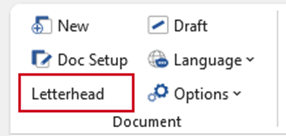
| Notes This function will “hide” the information contained in the letterhead so check its visibility by going to Print Preview in Word. |
Was this article helpful?
That’s Great!
Thank you for your feedback
Sorry! We couldn't be helpful
Thank you for your feedback
Feedback sent
We appreciate your effort and will try to fix the article